
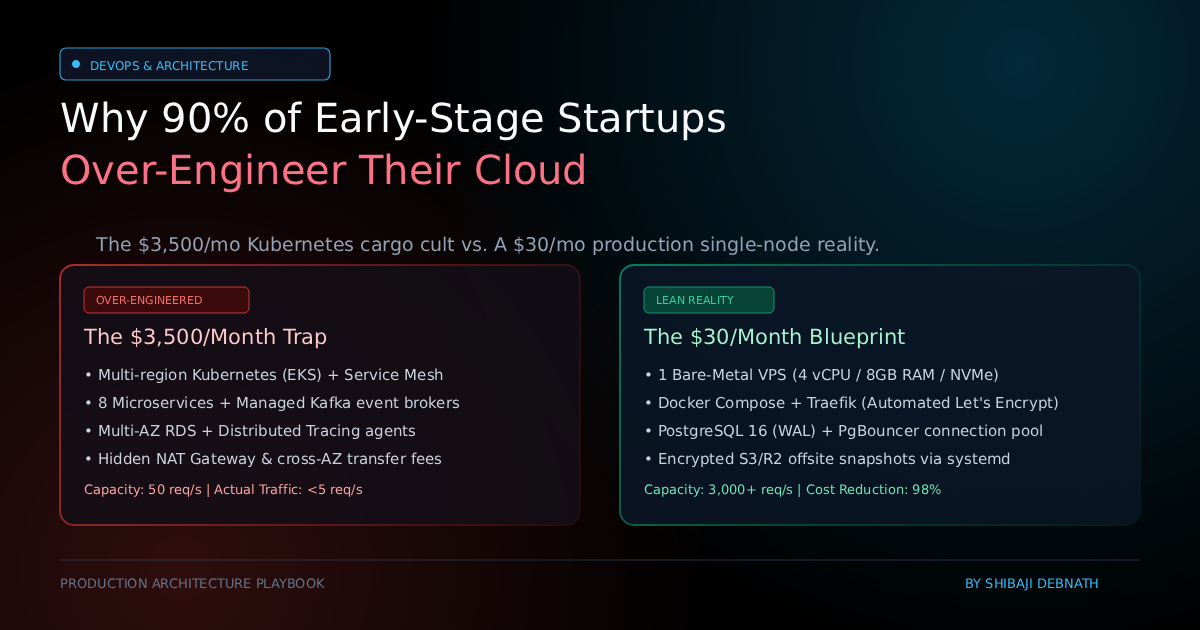
1. The Hook & The Problem Space
There is a recurring pathology in modern software engineering: a two-person team with zero paying users, thirty daily active visitors, and an infrastructure bill resembling that of a mid-sized financial institution.
Before writing their first domain model or speaking to ten potential customers, engineering teams routinely assemble:
- A managed Kubernetes cluster (EKS/GKE) spanning multiple availability zones.
- A managed message broker (Kafka or AWS SQS/SNS) for asynchronous jobs that could execute in an in-memory queue.
- A multi-region managed relational database with automated read replicas and connection proxies.
- Separate microservices for authentication, billing, notifications, and core business logic.
- A distributed tracing fabric (OpenTelemetry, Jaeger, Datadog) to track requests traversing eight network hops just to fetch a user profile.
The Toy Setup vs. 24/7 Production Reality
In tutorials and venture-backed conference talks, this architecture looks immaculate. Slide decks present decoupled components, infinite scalability, and resilient microservice boundaries.
In production, reality sets in quickly:
- The Cloud Bill Bleed: Managed control planes, NAT gateways ($0.045/GB plus hourly instance charges), inter-AZ data transfer fees, and premium observability agents accumulate into a monthly invoice of $1,500 to $4,000 before the product generates a single dollar of revenue.
- The Cognitive Tax: Instead of refining application logic and validating product-market fit, engineers spend 40% of their sprints debugging IAM roles, ingress controllers, VPC peering routes, and Helm charts.
- Data Isolation & Vendor Lock-In: Spreading unencrypted customer data across seven third-party SaaS platforms multiplies your attack surface and complicates compliance with data sovereignty regulations.
- Latency & Distributed Failure Modes: Every microservice boundary introduces network serialization, deserialization, connection timeouts, and partial failure states that require distributed transaction mechanisms (e.g., Saga patterns) to maintain consistency.
The iron rule of systems engineering: Premature scaling is the most expensive form of technical debt.
2. Core Concepts Made Simple
To design pragmatic infrastructure, founders and developers must understand two foundational compute models:
flowchart TD
    %% -------------------------------------------------------------
    %% 1. Traditional Microservice Architecture
    %% -------------------------------------------------------------
    subgraph Microservices ["⚠️ Traditional Microservice Cargo Cult"]
        direction TB
        Client1["🌐 Client Request"] --> Gateway["🚪 API Gateway"]

        Gateway -->|"gRPC"| Auth["🔐 Auth Service"]
        Auth --> UserDB[("🗄️ User DB")]

        Gateway -->|"HTTP"| Core["⚙️ Core Service"]
        Core --> Kafka["📨 Kafka / Message Broker"]
        Kafka --> Worker["👷 Background Worker"]
        Worker --> BillingDB[("🗄️ Billing DB")]

        Result1["❌ Result: High Network Latency<br/>• Distributed Failure Points<br/>• $1,000s/mo Cloud Bill"]
        UserDB -.-> Result1
        BillingDB -.-> Result1
    end

    %% -------------------------------------------------------------
    %% 2. Lean Monolithic Architecture
    %% -------------------------------------------------------------
    subgraph Monolith ["🚀 The Lean Modular Monolith (Production Architecture)"]
        direction TB
        Client2["🌐 Client Request"] --> Proxy["🛡️ Reverse Proxy<br/>(Traefik / Nginx)"]
        Proxy -->|"Fast Local Proxy"| App["📦 Unified Application Container<br/>(Auth + Core Logic + Workers)"]
        App -->|"Sub-ms IPC / Unix Socket"| LocalDB[("⚡ Local PostgreSQL / SQLite WAL")]

        Result2["✅ Result: Sub-millisecond IPC<br/>• Zero Cross-AZ Fees<br/>• Runs reliably on a $20–$40/mo VPS"]
        LocalDB -.-> Result2
    end

    %% -------------------------------------------------------------
    %% Class Definitions with High Contrast & Readability
    %% -------------------------------------------------------------
    class Client1,Client2 clientNode;
    class Result1 badResult;
    class Result2 goodResult;
The Capacity of Modern Compute
Hardware is remarkably powerful. A single modern bare-metal or cloud virtual core processes millions of instructions per second. A standard $30/month virtual private server (VPS) with 4 vCPUs and 8 GB of RAM running a well-tuned application stack (Node.js, Go, or Python behind a reverse proxy) can comfortably handle:
- 1,500 to 3,000 HTTP requests per second for dynamic web pages.
- 5,000+ operations per second for JSON API endpoints backed by indexed database queries.
If your startup serves 50,000 daily active users and each user initiates 50 HTTP requests throughout the day, your system handles 2.5 million daily requests—an average load of less than 30 requests per second. Running a distributed Kubernetes cluster for this workload is equivalent to hiring an entire freight train to deliver an envelope across town.
Vertical Scaling vs. Premature Horizontal Distribution
Vertical scaling (upgrading RAM, vCPU, and NVMe throughput on a single server) takes minutes and introduces zero architectural complexity. You do not need horizontal auto-scaling until your database writes saturated high-performance NVMe drives or your application hits saturating compute limits that vertical upgrades cannot resolve.
3. Architectural Stack Overview
A production-grade, single-node architecture provides 99.9% uptime, data privacy, and minimal overhead.
- Infrastructure Layer: High-performance VPS (AMD EPYC or ARM64, 4 vCPU, 8 GB RAM, NVMe storage) from providers such as Hetzner, OVHcloud, or baseline AWS Lightsail/DigitalOcean.
- Orchestration Layer: Docker Engine with native
docker compose. Reproducible, declarative, and portable across any Linux host without cluster overhead. - Reverse Proxy & Edge Routing: Traefik v3 or Caddy. Provides automatic Let’s Encrypt TLS certificate lifecycle management, HTTP/3 support, automated rate limiting, and gzip/brotli compression.
- Application Engine: Monolithic application container exposing an internal port to the Docker bridge network.
- Data & Cache Layer: Single-instance PostgreSQL 16 with Write-Ahead Logging (WAL) and local Redis for rate limiting and transient background job queues.
- Security & Perimeter: Linux
ufw(Uncomplicated Firewall) blocking all ports except22(SSH),80(HTTP), and443(HTTPS);fail2banprotecting SSH; automated encrypted off-site backups streamed to S3-compatible cold storage (Cloudflare R2 or MinIO).
4. Step-by-Step Implementation
Hardware Sizing Recommendations
- Minimum Staging / MVP: 2 vCPU, 4 GB RAM, 40 GB NVMe SSD.
- Standard Production Node: 4 vCPU, 8 GB–16 GB RAM, 80 GB–160 GB NVMe SSD.
Server Provisioning Commands
Connect to your clean Ubuntu 24.04 LTS instance and execute the following configuration steps:
# 1. Update system repositories and upgrade base packages
sudo apt update && sudo apt upgrade -y

# 2. Configure a 4GB swap file to prevent Out-Of-Memory (OOM) fatal process termination
sudo fallocate -l 4G /swapfile
sudo chmod 600 /swapfile
sudo mkswap /swapfile
sudo swapon /swapfile
echo '/swapfile none swap sw 0 0' | sudo tee -a /etc/fstab

# 3. Harden sysctl parameters for memory and network performance
cat <<EOF | sudo tee -a /etc/sysctl.d/99-custom.conf
vm.swappiness=10
vm.vfs_cache_pressure=50
net.core.somaxconn=1024
net.ipv4.tcp_max_syn_backlog=2048
EOF
sudo sysctl --system

# 4. Install essential utilities, Docker, and Docker Compose plugin
sudo apt install -y curl ufw fail2ban
curl -fsSL https://get.docker.com -o get-docker.sh
sudo sh get-docker.sh
sudo usermod -aG docker $USER

# 5. Configure Host Firewall (Strict ingress)
sudo ufw default deny incoming
sudo ufw default allow outgoing
sudo ufw allow 22/tcp comment 'SSH'
sudo ufw allow 80/tcp comment 'HTTP'
sudo ufw allow 443/tcp comment 'HTTPS'
sudo ufw --force enable
Production Docker Compose Definition
Create an application directory and save this production-grade stack specification as docker-compose.yml:
version: '3.8'

services:
  traefik:
    image: traefik:v3.1
    container_name: traefik
    restart: always
    command:
      - "--providers.docker=true"
      - "--providers.docker.exposedbydefault=false"
      - "--entrypoints.web.address=:80"
      - "--entrypoints.websecure.address=:443"
      - "--entrypoints.web.http.redirections.entrypoint.to=websecure"
      - "--entrypoints.web.http.redirections.entrypoint.scheme=https"
      - "--certificatesresolvers.letsencrypt.acme.tlschallenge=true"
      - "--certificatesresolvers.letsencrypt.acme.email=admin@example.com"
      - "--certificatesresolvers.letsencrypt.acme.storage=/letsencrypt/acme.json"
    ports:
      - "80:80"
      - "443:443"
    volumes:
      - "/var/run/docker.sock:/var/run/docker.sock:ro"
      - "traefik_certs:/letsencrypt"
    networks:
      - public_net

  postgres:
    image: postgres:16-alpine
    container_name: postgres
    restart: always
    environment:
      POSTGRES_DB: app_production
      POSTGRES_USER: postgres_admin
      POSTGRES_PASSWORD_FILE: /run/secrets/db_password
    secrets:
      - db_password
    volumes:
      - postgres_data:/var/lib/postgresql/data
    networks:
      - internal_net
    healthcheck:
      test: ["CMD-SHELL", "pg_isready -U postgres_admin -d app_production"]
      interval: 10s
      timeout: 5s
      retries: 5

  application:
    image: my-app:latest
    container_name: web_app
    restart: always
    depends_on:
      postgres:
        condition: service_healthy
    environment:
      NODE_ENV: production
      DATABASE_URL: postgres://postgres_admin:db_pass@postgres:5432/app_production
    labels:
      - "traefik.enable=true"
      - "traefik.http.routers.app.rule=Host(`api.example.com`)"
      - "traefik.http.routers.app.entrypoints=websecure"
      - "traefik.http.routers.app.tls.certresolver=letsencrypt"
      - "traefik.http.services.app.loadbalancer.server.port=3000"
    networks:
      - public_net
      - internal_net

secrets:
  db_password:
    file: ./secrets/db_password.txt

volumes:
  traefik_certs:
  postgres_data:

networks:
  public_net:
  internal_net:
    internal: true
5. Dual Implementations: Automated Backup & Storage Rotation
To replace expensive managed database snapshot services, here are dual, self-contained automation scripts in TypeScript and Python. Both handle database backup generation, Gzip compression, verification, and streaming to any standard S3/R2-compatible storage target, followed by local retention cleanup.
TypeScript Implementation
Save as backup-runner.ts. Runs natively with Node.js 20+ using ES modules.
import { exec } from 'node:child_process';
import { promisify } from 'node:util';
import { createReadStream, existsSync, mkdirSync, unlinkSync, readdirSync, statSync } from 'node:fs';
import { join } from 'node:path';
import { S3Client, PutObjectCommand } from '@aws-sdk/client-s3';

const execAsync = promisify(exec);

interface BackupConfig {
  dbContainer: string;
  dbUser: string;
  dbName: string;
  backupDir: string;
  s3Bucket: string;
  s3Endpoint?: string;
  retentionDays: number;
}

const config: BackupConfig = {
  dbContainer: process.env.DB_CONTAINER || 'postgres',
  dbUser: process.env.DB_USER || 'postgres_admin',
  dbName: process.env.DB_NAME || 'app_production',
  backupDir: process.env.BACKUP_DIR || '/var/backups/db',
  s3Bucket: process.env.S3_BUCKET || 'production-cold-storage',
  s3Endpoint: process.env.S3_ENDPOINT || undefined,
  retentionDays: 7,
};

const s3Client = new S3Client({
  region: process.env.AWS_REGION || 'auto',
  endpoint: config.s3Endpoint,
  credentials: {
    accessKeyId: process.env.AWS_ACCESS_KEY_ID || '',
    secretAccessKey: process.env.AWS_SECRET_ACCESS_KEY || '',
  },
});

async function runBackup(): Promise<void> {
  const timestamp = new Date().toISOString().replace(/[:.]/g, '-');
  const filename = `backup-${config.dbName}-${timestamp}.sql.gz`;
  const targetPath = join(config.backupDir, filename);

  if (!existsSync(config.backupDir)) {
    mkdirSync(config.backupDir, { recursive: true });
  }

  console.log(`[INIT] Starting database dump for: ${config.dbName}`);

  try {
    // 1. Execute stream dump via docker execution into gzip
    const dumpCmd = `docker exec -t ${config.dbContainer} pg_dump -U ${config.dbUser} ${config.dbName} | gzip > ${targetPath}`;
    await execAsync(dumpCmd);

    // Verify backup size
    const stats = statSync(targetPath);
    if (stats.size === 0) {
      throw new Error('Generated dump file is empty.');
    }
    console.log(`[OK] Dump generated: ${filename} (${(stats.size / 1024 / 1024).toFixed(2)} MB)`);

    // 2. Upload to S3-compatible object storage
    console.log(`[INIT] Streaming to object storage: ${config.s3Bucket}`);
    const fileStream = createReadStream(targetPath);
    const uploadCommand = new PutObjectCommand({
      Bucket: config.s3Bucket,
      Key: `database-backups/${filename}`,
      Body: fileStream,
      ContentType: 'application/gzip',
    });

    await s3Client.send(uploadCommand);
    console.log(`[OK] Upload completed successfully.`);

    // 3. Clean up local backups older than retention policy
    cleanOldBackups(config.backupDir, config.retentionDays);

  } catch (error: unknown) {
    const message = error instanceof Error ? error.message : String(error);
    console.error(`[ERROR] Backup workflow failed: ${message}`);
    if (existsSync(targetPath)) {
      unlinkSync(targetPath);
    }
    process.exit(1);
  }
}

function cleanOldBackups(directory: string, retentionDays: number): void {
  const now = Date.now();
  const cutoffTime = now - retentionDays * 24 * 60 * 60 * 1000;
  const files = readdirSync(directory);

  for (const file of files) {
    const fullPath = join(directory, file);
    const fileStats = statSync(fullPath);
    if (fileStats.isFile() && fileStats.mtimeMs < cutoffTime) {
      unlinkSync(fullPath);
      console.log(`[CLEANUP] Deleted expired backup: ${file}`);
    }
  }
}

runBackup();
Python Implementation
Save as backup_runner.py. Written with strict Python 3.11+ type hints and standard error guards.
#!/usr/bin/env python3
"""
Production Database Backup and Offsite Replication Runner.
Compatible with standard S3 API, Cloudflare R2, and local PostgreSQL.
"""

from __future__ import annotations

import os
import sys
import subprocess
import time
from pathlib import Path
from typing import Final
import boto3
from botocore.exceptions import BotoCoreError, ClientError

DB_CONTAINER: Final[str] = os.getenv("DB_CONTAINER", "postgres")
DB_USER: Final[str] = os.getenv("DB_USER", "postgres_admin")
DB_NAME: Final[str] = os.getenv("DB_NAME", "app_production")
BACKUP_DIR: Final[Path] = Path(os.getenv("BACKUP_DIR", "/var/backups/db"))
S3_BUCKET: Final[str] = os.getenv("S3_BUCKET", "production-cold-storage")
S3_ENDPOINT: Final[str | None] = os.getenv("S3_ENDPOINT", None)
RETENTION_DAYS: Final[int] = int(os.getenv("RETENTION_DAYS", "7"))


def purge_expired_backups(directory: Path, days: int) -> None:
    cutoff_epoch = time.time() - (days * 86400)
    for entry in directory.glob("*.sql.gz"):
        if entry.is_file() and entry.stat().st_mtime < cutoff_epoch:
            entry.unlink()
            print(f"[CLEANUP] Removed expired local backup: {entry.name}")


def execute_backup() -> None:
    BACKUP_DIR.mkdir(parents=True, exist_ok=True)
    timestamp: str = time.strftime("%Y-%m-%d_%H-%M-%S")
    target_filename: str = f"backup-{DB_NAME}-{timestamp}.sql.gz"
    target_filepath: Path = BACKUP_DIR / target_filename

    print(f"[INIT] Commencing database dump: {DB_NAME}")

    dump_command: str = (
        f"docker exec -t {DB_CONTAINER} pg_dump -U {DB_USER} {DB_NAME} "
        f"| gzip > {target_filepath}"
    )

    try:
        # Execute PostgreSQL dump via shell pipe
        result = subprocess.run(
            dump_command,
            shell=True,
            check=True,
            stderr=subprocess.PIPE,
            text=True
        )

        if not target_filepath.exists() or target_filepath.stat().st_size == 0:
            raise RuntimeError("Database dump output failed: Generated archive is 0 bytes.")

        file_size_mb = target_filepath.stat().st_size / (1024 * 1024)
        print(f"[OK] Archive successfully generated: {target_filename} ({file_size_mb:.2f} MB)")

        # Initialize S3 client
        s3_client = boto3.client(
            "s3",
            endpoint_url=S3_ENDPOINT,
            aws_access_key_id=os.getenv("AWS_ACCESS_KEY_ID"),
            aws_secret_access_key=os.getenv("AWS_SECRET_ACCESS_KEY"),
            region_name=os.getenv("AWS_REGION", "auto")
        )

        print(f"[INIT] Uploading to offsite object bucket: {S3_BUCKET}")
        s3_key: str = f"database-backups/{target_filename}"
        s3_client.upload_file(str(target_filepath), S3_BUCKET, s3_key)
        print(f"[OK] Offsite replication complete: s3://{S3_BUCKET}/{s3_key}")

        # Enforce local disk retention policy
        purge_expired_backups(BACKUP_DIR, RETENTION_DAYS)

    except (subprocess.CalledProcessError, RuntimeError, BotoCoreError, ClientError) as err:
        print(f"[ERROR] Backup task aborted due to fatal error: {err}", file=sys.stderr)
        if target_filepath.exists():
            target_filepath.unlink()
        sys.exit(1)


if __name__ == "__main__":
    execute_backup()
6. Production FAQ
1. How do you prevent Out-Of-Memory (OOM) killer crashes on a single small VPS?
When running Docker workloads on nodes with 4 GB–8 GB of RAM, sudden traffic bursts or unindexed database queries can cause memory pressure.
- Always provision a swap partition or swap file equal to at least 50%–100% of your physical RAM (e.g., 4 GB swap for an 8 GB VPS) with
vm.swappiness=10. This allows the kernel to offload stagnant memory pages to disk rather than killing the active application or database process. - Configure explicit memory limits in your
docker-compose.ymlfor non-critical containers (e.g.,mem_limit: 1g), preventing any single rogue container from starving the host operating system.
2. How do you manage database concurrency and connection exhaustion without an enterprise cloud proxy?
Early-stage applications often crash because the web framework spawns thousands of concurrent database connections during traffic spikes.
- Place a lightweight connection pooler like PgBouncer in front of PostgreSQL, or configure strict connection pooling inside your application (e.g., Prisma, TypeORM, or SQLAlchemy connection pool maximums set to 20–30 connections per worker).
- PostgreSQL performs best when its active query connection count stays close to
(2 * CPU_cores) + effective_spindle_count. Fifty well-tuned, persistent connections can easily handle thousands of requests per second without the resource exhaustion caused by unconstrained pool spawning.
3. How do you mitigate memory leaks in long-running Node.js or Python application containers?
In a single-box architecture, a memory leak will eventually degrade overall host performance.
- Use Docker’s built-in restart policies combined with native container health checks.
- For Node.js services, configure
--max-old-space-sizeto enforce an explicit heap limit and run with an init system (tiniordocker run --init) to prevent zombie process accumulation. - For Python services (such as Gunicorn or Uvicorn), configure
--max-requests 1000and--max-requests-jitter 100. This causes worker processes to gracefully recycle after processing a set batch of requests, purging accumulated memory leaks without dropping active traffic.
4. How do you achieve zero-downtime rolling deployments without Kubernetes?
You do not need a full container orchestrator for zero-downtime updates:
- With Traefik or Nginx acting as the ingress, you can deploy a secondary instance of your application container (e.g.,
web_app_blueandweb_app_green), wait for the health check to return200 OK, dynamically update the proxy routing, and decommission the previous container. - Alternatively, tools like Kamal or Dokku provide production-tested rolling updates, health verification, and asset pre-compilation on a standard single-node VPS using nothing more than Docker and SSH keys.