
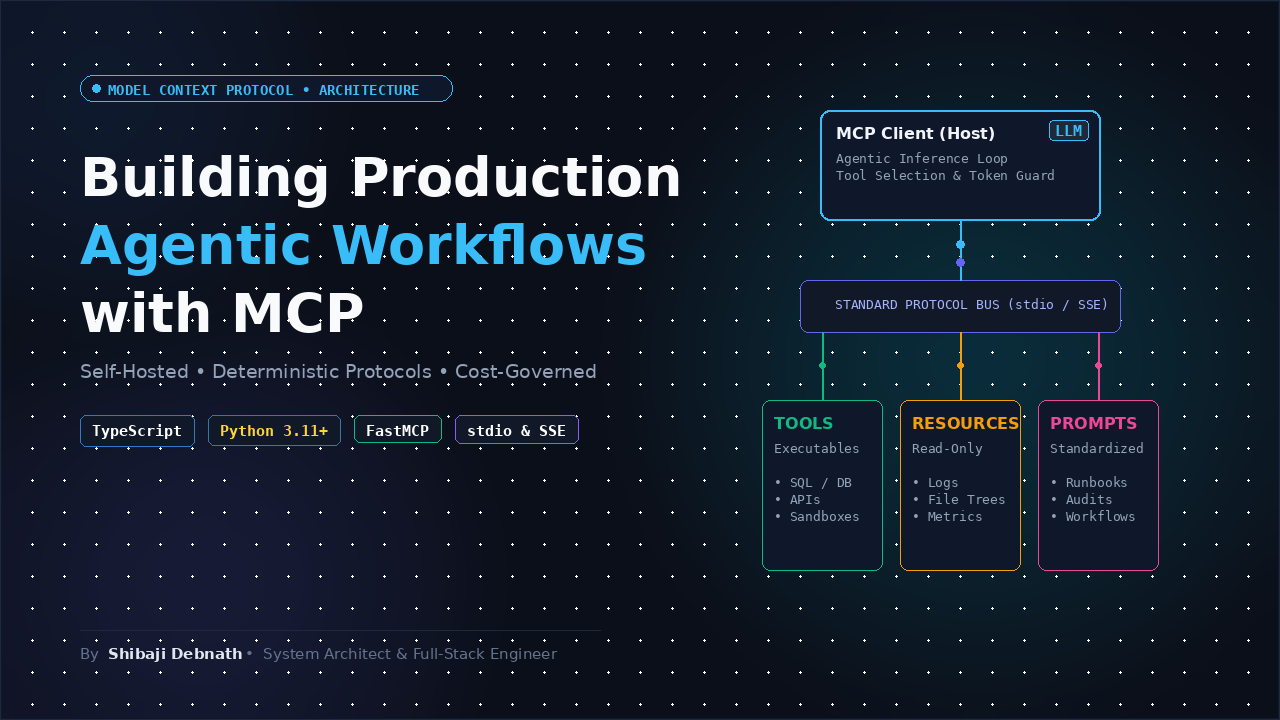
1. The Production Reality: Moving Beyond Fragile Toy Agents
Building a proof-of-concept AI agent takes thirty minutes: wire an LLM client to a hardcoded Python script, provide a few JSON function definitions in the prompt, and watch the model inspect mock data.
Running agentic systems in production 24/7 is a different discipline. Ad-hoc tool implementations quickly hit systemic failure modes:
- SaaS Margin Bleed: Proprietary orchestration platforms wrap simple API calls in opaque runtime layers, adding compounding latency and per-step platform markup on top of raw token consumption.
- Security & Data Egress Risks: Exposing internal databases, Git repos, or proprietary microservices to black-box cloud orchestrators forces developers to punch holes in private VPCs and share production credentials with third-party servers.
- Brittle Interface Debt: Every new LLM provider requires custom tool-calling adapters, bespoke serialization logic, and error-handling shims. When API schemas shift, client code breaks silently.
Production architectures require standardized interfaces, isolated process boundaries, deterministic error handling, and strict cost controls. The Model Context Protocol (MCP) directly solves this coupling problem by providing an open, vendor-neutral standard for connecting agentic runtimes to tools and contextual data sources.
2. Core Concepts: The “USB-C” Mental Model
Model Context Protocol (MCP) functions as a universal communication protocol between agent runtimes (Hosts/Clients) and capability providers (Servers).
Instead of writing bespoke adapters for every database, file system, or internal REST API, you write an MCP server once. Any MCP-compliant client can discover its capabilities, validate input parameters, and invoke actions over standardized transports.
flowchart LR
    subgraph Agent Host Runtime
        Client[MCP Client]
        LLM[LLM Engine]
        Client <--> LLM
    end

    subgraph Transport Layer
        StdIO[Standard Input / Output]
        SSE[HTTP + SSE Transport]
    end

    subgraph MCP Servers
        S1[(PostgreSQL / SQLite Server)]
        S2[Filesystem / Git Server]
        S3[Telemetry & Internal API Server]
    end

    Client -- "Child Process (Local)" --> StdIO --> S1
    Client -- "Child Process (Local)" --> StdIO --> S2
    Client -- "Network Boundary (Remote)" --> SSE --> S3
The Three MCP Primitives
- Tools (Actionable Executables): Functions the model can trigger to mutate state or query external systems (e.g.,
execute_sql_query,deploy_container). Tools define their input arguments using JSON Schema. - Resources (Contextual Data): Read-only artifacts accessed via standard URI schemes (e.g.,
db://metrics/live,file:///var/log/audit.log). Resources supply background context without model-directed execution side effects. - Prompts (Standardized Workflows): Server-provided prompt templates designed to steer the LLM through specific domain operations.
Transports: Local vs. Networked
- stdio (Standard I/O): The host spawns the MCP server as an isolated child process, communicating over
stdinandstdout. Zero network configuration, minimal overhead, and native container isolation make this the default pattern for self-hosted single-host nodes. - HTTP with Server-Sent Events (SSE): Used when the server runs on a dedicated remote host across a secure internal network. The client sends JSON-RPC requests via HTTP
POSTand listens for streaming notifications over anSSEstream.
3. Architectural Stack Overview
A reliable, self-hosted production deployment relies on an itemized stack with clean operational separation:
-
Infrastructure: Minimal bare-metal VPS or isolated Linux container (Ubuntu 24.04 LTS).
-
Minimum baseline: 2 vCPU, 4 GB RAM, 20 GB NVMe storage.
-
Orchestration & Process Control: Linux
systemdor rootlessPodman/Dockercontainers to enforce per-server memory limits, CPU quotas, and process auto-restart policies. -
Model Engine / Gateway: Self-hosted OpenAI-compatible inference endpoint (e.g., vLLM or Ollama on an internal GPU node) or a direct secure egress proxy to your foundation model provider.
-
MCP Protocol Layer: Official Model Context Protocol SDKs (
@modelcontextprotocol/sdkfor TypeScript;mcpfor Python). -
Security & Boundary Isolation: Local server execution runs under restricted unprivileged system users (
nobodyor dedicatedmcp-svc). Strict validation on incoming JSON schemas prevents arbitrary code or SQL injection.
4. Step-by-Step Implementation
Step 1: Environment & Directory Preparation
Run the following commands on your Linux host to initialize your project directories and install dependencies:
# Update base repositories and install system packages
sudo apt-get update && sudo apt-get install -y curl build-essential python3 python3-pip python3-venv

# Create a dedicated directory for our MCP architecture
mkdir -p /opt/mcp-agentic-stack/{ts-stack,py-stack}
cd /opt/mcp-agentic-stack
5. Dual Implementations: TypeScript & Python
Below are production-ready, fully functional implementations of both an MCP Server (exposing a system diagnostic tool and a read-only resource) and an MCP Client Agent Loop.
Implementation A: TypeScript (Modern ESM)
1. Setup & Package Configuration
Inside /opt/mcp-agentic-stack/ts-stack:
cd /opt/mcp-agentic-stack/ts-stack
npm init -y
npm install @modelcontextprotocol/sdk zod
npm install -D typescript @types/node tsx
Update package.json to include "type": "module":
{
  "name": "ts-mcp-production",
  "version": "1.0.0",
  "type": "module",
  "scripts": {
    "server": "tsx server.ts",
    "client": "tsx client.ts"
  },
  "dependencies": {
    "@modelcontextprotocol/sdk": "^1.6.0",
    "zod": "^3.23.8"
  },
  "devDependencies": {
    "@types/node": "^22.0.0",
    "tsx": "^4.19.0",
    "typescript": "^5.5.0"
  }
}
2. MCP Server (server.ts)
import { Server } from "@modelcontextprotocol/sdk/server/index.js";
import { StdioServerTransport } from "@modelcontextprotocol/sdk/server/stdio.js";
import {
  CallToolRequestSchema,
  ListToolsRequestSchema,
  ListResourcesRequestSchema,
  ReadResourceRequestSchema,
} from "@modelcontextprotocol/sdk/types.js";
import os from "node:os";

// 1. Initialize the MCP Server instance
const server = new Server(
  {
    name: "production-system-metrics-server",
    version: "1.0.0",
  },
  {
    capabilities: {
      tools: {},
      resources: {},
    },
  }
);

// 2. Expose available resources
server.setRequestHandler(ListResourcesRequestSchema, async () => {
  return {
    resources: [
      {
        uri: "system://diagnostics/specs",
        name: "Host Hardware Specifications",
        mimeType: "application/json",
        description: "Static CPU architecture and total system memory specifications.",
      },
    ],
  };
});

// 3. Handle resource content queries
server.setRequestHandler(ReadResourceRequestSchema, async (request) => {
  if (request.params.uri === "system://diagnostics/specs") {
    const specs = {
      platform: os.platform(),
      arch: os.arch(),
      cpuCores: os.cpus().length,
      totalMemoryMB: Math.round(os.totalmem() / (1024 * 1024)),
    };

    return {
      contents: [
        {
          uri: request.params.uri,
          mimeType: "application/json",
          text: JSON.stringify(specs, null, 2),
        },
      ],
    };
  }
  throw new Error(`Resource not found: ${request.params.uri}`);
});

// 4. Register tools
server.setRequestHandler(ListToolsRequestSchema, async () => {
  return {
    tools: [
      {
        name: "get_memory_usage",
        description: "Calculates current heap and system memory utilization.",
        inputSchema: {
          type: "object",
          properties: {
            includeFreeMemory: {
              type: "boolean",
              description: "Whether to include raw free memory calculations.",
            },
          },
          required: [],
        },
      },
    ],
  };
});

// 5. Handle tool execution with strict error boundaries
server.setRequestHandler(CallToolRequestSchema, async (request) => {
  const { name, arguments: args } = request.params;

  if (name === "get_memory_usage") {
    try {
      const freeMem = os.freemem();
      const totalMem = os.totalmem();
      const usedMem = totalMem - freeMem;
      const usagePercentage = ((usedMem / totalMem) * 100).toFixed(2);

      const payload: Record<string, unknown> = {
        usagePercentage: `${usagePercentage}%`,
        usedMemoryMB: Math.round(usedMem / (1024 * 1024)),
      };

      if (args && (args as { includeFreeMemory?: boolean }).includeFreeMemory) {
        payload.freeMemoryMB = Math.round(freeMem / (1024 * 1024));
      }

      return {
        content: [
          {
            type: "text",
            text: JSON.stringify(payload, null, 2),
          },
        ],
      };
    } catch (error) {
      return {
        isError: true,
        content: [
          {
            type: "text",
            text: `Failed to retrieve memory metrics: ${(error as Error).message}`,
          },
        ],
      };
    }
  }

  throw new Error(`Unrecognized tool name: ${name}`);
});

// 6. Connect via Standard Input/Output
async function run() {
  const transport = new StdioServerTransport();
  await server.connect(transport);
  process.stderr.write("TypeScript MCP Server active and running on stdio.\n");
}

run().catch((err) => {
  process.stderr.write(`Fatal error running server: ${err.message}\n`);
  process.exit(1);
});
3. MCP Agent Client (client.ts)
import { Client } from "@modelcontextprotocol/sdk/client/index.js";
import { StdioClientTransport } from "@modelcontextprotocol/sdk/client/stdio.js";

async function executeAgentWorkflow() {
  // 1. Configure the stdio transport to spawn the server process
  const transport = new StdioClientTransport({
    command: "npx",
    args: ["tsx", "server.ts"],
  });

  const client = new Client(
    {
      name: "production-agent-runner",
      version: "1.0.0",
    },
    {
      capabilities: {},
    }
  );

  await client.connect(transport);
  console.log("[Agent Host] Successfully connected to MCP Server.");

  // 2. Discover available capabilities dynamically
  const toolsResponse = await client.listTools();
  console.log(`[Agent Host] Discovered ${toolsResponse.tools.length} tool(s):`);
  for (const tool of toolsResponse.tools) {
    console.log(` - ${tool.name}: ${tool.description}`);
  }

  // 3. Execute a validated tool call
  console.log("[Agent Host] Invoking tool: get_memory_usage...");
  const result = await client.callTool({
    name: "get_memory_usage",
    arguments: { includeFreeMemory: true },
  });

  console.log("[Agent Host] Tool Result Received:");
  console.log(result.content[0].text);

  // 4. Clean shutdown of child processes
  await client.close();
  console.log("[Agent Host] Connection closed gracefully.");
}

executeAgentWorkflow().catch((err) => {
  console.error("[Agent Host] Workflow execution failed:", err);
  process.exit(1);
});
Implementation B: Python (Python 3.11+ Asyncio)
1. Setup & Environment
Inside /opt/mcp-agentic-stack/py-stack:
cd /opt/mcp-agentic-stack/py-stack
python3 -m venv .venv
source .venv/bin/activate
pip install --upgrade pip
pip install mcp
2. MCP Server (server.py)
import asyncio
import os
import sys
from mcp.server.fastmcp import FastMCP

# 1. Initialize FastMCP instance
mcp = FastMCP("Production-Python-System-Server")

# 2. Register a read-only resource
@mcp.resource("system://diagnostics/specs")
def get_system_specs() -> str:
    """Return host architecture and kernel release version."""
    return (
        f"Platform: {sys.platform}\n"
        f"Python Version: {sys.version.split()[0]}\n"
        f"PID: {os.getpid()}"
    )

# 3. Register a deterministic tool
@mcp.tool()
def compute_disk_utilization(target_path: str = "/") -> dict[str, str | int | float]:
    """Inspect disk capacity and utilization percentage for a target path."""
    try:
        stat = os.statvfs(target_path)
        block_size = stat.f_frsize
        total_blocks = stat.f_blocks
        free_blocks = stat.f_bavail

        total_bytes = block_size * total_blocks
        free_bytes = block_size * free_blocks
        used_bytes = total_bytes - free_bytes

        used_gb = round(used_bytes / (1024**3), 2)
        total_gb = round(total_bytes / (1024**3), 2)
        percentage = round((used_bytes / total_bytes) * 100, 2)

        return {
            "path": target_path,
            "total_gb": total_gb,
            "used_gb": used_gb,
            "utilization_percent": f"{percentage}%",
        }
    except Exception as exc:
        return {"error": f"Failed to calculate disk usage: {str(exc)}"}

if __name__ == "__main__":
    # FastMCP uses standard input/output transport by default
    mcp.run(transport="stdio")
3. MCP Agent Client (client.py)
import asyncio
import json
import sys
from mcp import ClientSession, StdioServerParameters
from mcp.client.stdio import stdio_client

async def run_client_workflow():
    # 1. Configure the server startup parameters
    server_params = StdioServerParameters(
        command=sys.executable,
        args=["server.py"],
        env=None
    )

    print("[Python Agent] Spawning child MCP server process...")
    async with stdio_client(server_params) as (read, write):
        async with ClientSession(read, write) as session:
            # 2. Initialize protocol handshake
            await session.initialize()
            print("[Python Agent] Handshake established.")

            # 3. Discover available tools
            tools_list = await session.list_tools()
            print(f"[Python Agent] Found {len(tools_list.tools)} tool(s):")
            for tool in tools_list.tools:
                print(f" - {tool.name}: {tool.description}")

            # 4. Invoke a specific tool
            print("[Python Agent] Calling 'compute_disk_utilization' for '/'...")
            response = await session.call_tool(
                name="compute_disk_utilization",
                arguments={"target_path": "/"}
            )

            print("[Python Agent] Raw output received from server:")
            for item in response.content:
                if hasattr(item, "text"):
                    print(item.text)

if __name__ == "__main__":
    asyncio.run(run_client_workflow())
6. Production Hardening: Systemd Service Isolation
In production environments, never launch server scripts interactively inside user terminals. Run network-facing MCP endpoints or persistent background workers under Linux systemd to enforce cgroups quotas and automatic restarts.
Create /etc/systemd/system/mcp-server.service:
[Unit]
Description=Production Model Context Protocol Microservice
After=network.target

[Service]
Type=simple
User=nobody
Group=nogroup
WorkingDirectory=/opt/mcp-agentic-stack/ts-stack
ExecStart=/usr/bin/node /opt/mcp-agentic-stack/ts-stack/dist/server.js
Restart=always
RestartSec=5s

# Production Resource & Security Governance
MemoryMax=512M
CPUQuota=50%
NoNewPrivileges=true
ProtectSystem=strict
ProtectHome=true
PrivateTmp=true

[Install]
WantedBy=multi-user.target
Enable and verify the service:
sudo systemctl daemon-reload
sudo systemctl enable --now mcp-server.service
sudo systemctl status mcp-server.service
7. Production FAQ
How do we handle process zombies and memory leaks with stdio servers running 24/7?
In stdio architectures, the host client acts as the parent process. If the client terminates unexpectedly, child processes can become orphaned zombies.
To mitigate this:
- Always catch parent termination signals (
SIGINT,SIGTERM) to clean up child pipes. - Implement explicit health-check timeouts: if an MCP server fails to respond to a ping or tool call within a strict deadline (e.g., 10 seconds), kill and respawn the subprocess.
- Use Linux cgroups or
MemoryMaxsettings in systemd/Docker to prevent uncontrolled memory ballooning.
What prevents an agent from executing dangerous inputs via an MCP tool?
The model itself does not execute code; the MCP server does. Never expose arbitrary shell execution tools (eval, sh -c) to an autonomous model.
Instead, construct constrained, domain-specific tools with narrow schemas. Validate all incoming parameters against strict Zod or Pydantic schemas before running backend logic. Sanitize paths against directory traversal attacks (path.resolve checks) and use parameterized queries for all database drivers.
When should teams choose stdio over HTTP + SSE?
- Use stdio when: The tools, agent runtime, and host live on the same physical host or inside the same container pod. It eliminates authentication management overhead, networking hops, and TLS configuration.
- Use HTTP + SSE when: Different engineering teams manage specialized tool servers across distributed infrastructure, or when multiple agent instances need to share access to a centralized, stateful MCP tool server behind an internal reverse proxy.
How do we prevent infinite execution loops during agentic workflows?
Autonomous agents can enter repetitive retry cycles if a tool returns an ambiguous error. Enforce three boundaries inside the agent loop:
- Maximum Step Count: Hard-cap total tool executions per request (e.g., maximum 5 iterations).
- Token & Budget Caps: Stop execution if cumulative prompt and completion tokens exceed your predetermined ceiling.
- Repeated Argument Detection: If an agent attempts to invoke the exact same tool with identical arguments consecutively, interrupt the loop and return a graceful fallback response to the user.